


Getcontact
4.04.27K Reviews
App Specs
- Version
- 8.16.0
- Updated On
- License
- Free
- Downloads
- 100,000,000+
- Developer
- Getverify LDA
- Categories
- Communication
- Platform
- Android, iOS
Screenshots
 Analysis by AppCompare
I can see the first-week appeal of Getcontact: an unfamiliar number appears, and the app offers a chance to find out whether it belongs to someone worth answering or a caller I would rather avoid. That small moment can make a call-focused app feel immediately useful. The bigger question, for me, is whether that relief keeps paying off after the novelty wears off, and whether I’m comfortable with the choices involved in using a community-powered caller ID service.
Where it earns a place in the first week
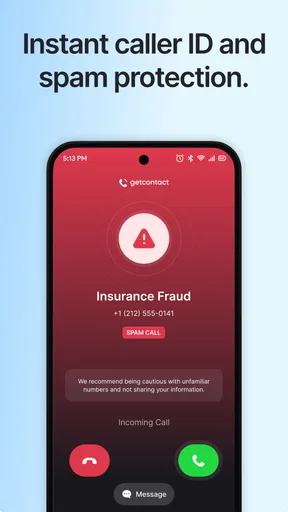
Getcontact is a free communication app from Getverify LDA, built around caller identification and tools for dealing with unwanted calls and texts. Its appeal is easiest to understand when an unknown number interrupts something: I might be expecting a delivery or a call back, but I don’t want to answer every unfamiliar number just in case. A caller label can help me make a more informed decision without turning each interruption into a guessing game.
The useful habit is to treat identification as a clue, not a guarantee. A label can be outdated, mistaken, or too broad to settle whether a call is safe or relevant. If I’m waiting for something important, I’d still use context and judgment rather than rejecting a call solely because a community label looks suspicious. That caution matters most when the number is new or the caller’s purpose is unclear.
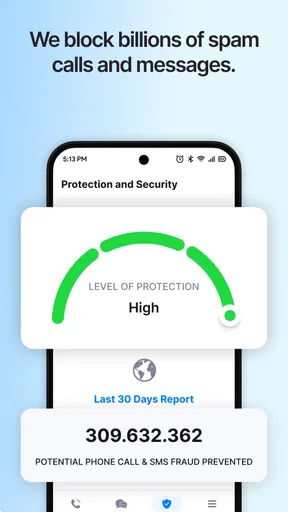
Spam handling is the other quick payoff. Instead of dealing with every nuisance call from scratch, I can use the app’s identification and blocking approach to reduce interruptions, while reporting a number when I recognize it as unwanted. Reporting can help the wider pool of users, but it also asks me to spend a moment contributing rather than simply receiving a benefit. I’d use that option when the classification seems clear, not as a reflex after one annoying call.
What changes after the novelty fades
Over time, the question shifts from “Can it identify this caller?” to “Does it help often enough to justify staying in my routine?” For someone who regularly receives unfamiliar calls, even occasional useful identification may be worth keeping. For someone whose calls mostly come from saved contacts, the app may sit unused for long stretches. Its value depends less on a dramatic first test and more on how often unknown callers actually disrupt your day.
That also makes Getcontact different from relying only on a phone’s built-in call controls. The standard tools are convenient and already part of the device, while a community-based service can offer a broader source of labels and user reports. I’d see them as complementary rather than assuming one always replaces the other: built-in controls suit someone who wants a simple, low-maintenance way to silence or filter calls, while Getcontact may be more appealing if identifying an unfamiliar number is the main problem.
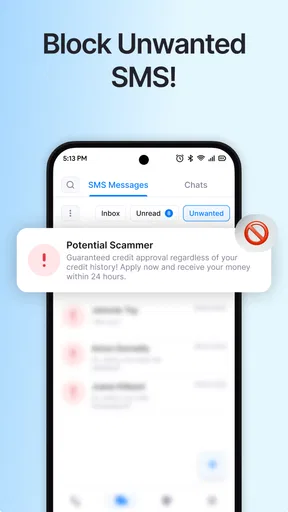
Text messages bring a related decision. The app’s store summary includes SMS blocking, so it may appeal to someone who wants call and message screening in one place. Still, I would check how the available controls behave on my device before making it the center of my messaging routine. People who are already happy with their default messaging app, or who rarely receive unwanted messages, may not gain enough to justify changing habits.
Worth Reading Before You Choose

Flipboard Shows What News Apps Must Do Beyond the Feed

Switching to Android Auto Means Rethinking Your Driving Routine

Google Calendar Makes a Crowded Week Easier to Manage

Ludo King Makes the Most of the Minutes Between Plans

Baby Panda World Brings Quick Play to Modern Phones, but Its Game Library Feels Busy

ESPN’s Live Game View Makes Following Close Games Easier
Keeping it useful without making it a chore
I’d keep Getcontact focused on the moments when an unfamiliar call actually needs a decision, rather than turning caller labels into something to browse for reassurance. That gives the app a clear job and makes it easier to notice whether it is still saving effort after the first few weeks. I’d also revisit its settings now and then, so the balance between useful screening and the information I’m comfortable sharing stays deliberate.
A lighter, more deliberate routine
My practical approach would be to use Getcontact at the point where it can answer a real question, rather than constantly checking labels out of curiosity. If a call comes in from an unfamiliar number, I can look at the identification, weigh it against what I’m expecting, and decide whether to answer, ignore it, or investigate further. If the number is clearly unwanted, reporting it can be useful; if the label is vague, I’d avoid treating it as proof.
There’s a small but important trade-off in that workflow: community reports become more valuable when people contribute, yet every extra interaction takes attention. I wouldn’t report a number simply because I don’t recognize it. A legitimate business, a one-time service contact, or someone calling from a new phone could be unfamiliar without being spam. Using the report feature carefully helps avoid turning uncertainty into a confident label that may affect other users.
Another reason to keep the routine modest is privacy. The app’s identification approach draws on a user-contributed database, and the original setup experience asks for a phone number to create an account. I’d take time to review permissions and privacy settings before deciding how much of my contact-related information I’m comfortable sharing. That isn’t a reason to assume the app handles data improperly; it is a reason to make an informed choice, especially if I prefer to keep my address book and caller information tightly controlled.
Who is likely to benefit—and who may not
I’d recommend considering Getcontact if unknown calls are a recurring nuisance, if you want a way to assess unfamiliar numbers before answering, or if you are willing to contribute occasional reports to a shared identification system. The fact that it has passed 100 million installs suggests it has reached a large audience, while its 3.8 average from around 4.2 million ratings points to a mixed experience rather than a universal fix. That balance matches how I’d frame it: useful for a particular call problem, but not essential for every phone user.
I’d be more hesitant if privacy is a major concern, if you dislike creating accounts with your number, or if you don’t want to review permissions and settings. It may also be unnecessary when your phone’s own call screening already handles your needs, or when unfamiliar callers are rare enough that checking them is no burden. For those users, the built-in option is likely the easier place to start; Getcontact makes more sense when the extra community context is worth the added setup and attention.
Cost is straightforward at the entry point: the app is free to download, but it includes optional in-app purchases ranging from $0.49 to $299.99 per item. I’d decide whether its everyday call-management benefit is enough before considering any paid options, and check the purchase details in the app rather than assuming a purchase is necessary for the basic use I want. The audience rating is Everyone, but that age label doesn’t answer the more personal question of whether its data and contact-related choices suit your household.
Compatibility, expectations, and staying power
The current version is 8.11.0, and the minimum operating-system requirement is Android 8.0. It was released on April 4, 2016, so this is an established service rather than a brand-new experiment. I’d still check compatibility on the device I plan to use, particularly if I’m switching phones or operating systems, and I’d make sure the app’s call and message controls fit the way that device handles screening. The app’s age and reach can be reassuring, but neither guarantees that every identification will be right for every number.
One question people often have is whether they need to answer a suspicious call to find out who it is. The point of caller identification is to help assess a number before deciding what to do, but I would not treat a displayed name or tag as verified identity. If a caller claims to represent a bank, delivery service, or other organization and asks for sensitive information, I’d use a trusted channel to contact that organization independently rather than relying on the incoming number’s label.
Another practical question is whether the app can replace a phone’s own blocking tools. I wouldn’t make that assumption. The built-in controls are a sensible fallback and may be all a light user needs; Getcontact’s advantage is the additional community-driven context and reporting workflow. Keeping the phone’s native options in mind also makes it easier to adjust if the app doesn’t fit your routine or if a label seems unreliable.
Getcontact’s category is communication, but I’d judge it less like a messaging destination and more like a filter around incoming calls and texts. It is not where I’d expect to spend a lot of time. Its strongest case is reducing uncertainty at the moment a number appears, not replacing conversations, contacts, or the phone’s basic tools. That narrow role can be a strength: the app only needs to be helpful at the right moment to earn its space, provided it doesn’t create more checking and second-guessing than it saves.
My long-term verdict
After downloading Getcontact from the App Store, I found the setup process to be pretty straightforward. It asks for your phone number to create an account, which is pretty standard for apps dealing with contacts and calls. Once you’re in, you’re greeted with a clean, user-friendly interface that makes navigation a breeze.
Features That Stand Out
One of the standout features is the ability to identify callers. I tested this out by having a friend call me from an unknown number, and sure enough, Getcontact identified the caller accurately. It’s like having a personal assistant vetting your calls. Pretty neat, right?
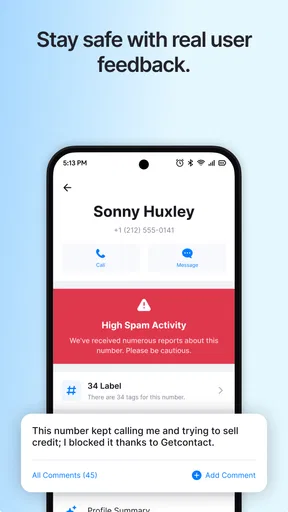
Another cool feature is the spam-blocking capability. The app automatically flags and blocks spam calls, which is a lifesaver if you’re tired of those pesky telemarketers. Plus, you can even report numbers yourself, contributing to the community-driven database.
Digging Deeper
So, how does Getcontact manage to pull off this magic trick? The app taps into a vast database of caller IDs, contributed by users worldwide. It’s a bit like crowdsourcing for call identification. However, this does mean you’re sharing your contacts to some extent, so privacy-conscious users might want to double-check the privacy settings.
Additionally, there’s a feature called "Tag" which lets you see how other users have tagged a particular number. For instance, if a number is commonly tagged as "Spam" or "Telemarketer," you know what to expect. It’s like having a heads-up display for your calls!
Personal Thoughts
I have to say, I’m pretty impressed with what Getcontact offers. It’s simple, effective, and does exactly what it promises. The call identification is accurate, and the spam-blocking feature saves you a ton of hassle. However, I’d recommend being mindful of the permissions you grant, ensuring you’re comfortable with how your data is used.
For those who find themselves dodging unknown calls or dealing with unwanted spam, this app could be a game-changer. The community-driven aspect also adds a layer of reliability and constant updating, which keeps the app relevant and useful.
So, if you’re looking to take control of your call experience, give Getcontact a try. You might just find it becomes an essential tool in your digital toolkit.
Pros
- Efficiently identifies unknown callers.
- User-friendly interface with easy navigation.
- Offers spam call protection features.
- Provides a detailed caller history log.
- Supports multiple languages for global users.
Cons
- Requires internet connection for full functionality.
- Some features locked behind a paywall.
- Privacy concerns due to data access.
- Occasional incorrect caller identification.
- Ads can be intrusive in the free version.
FAQs for Getcontact
What is Getcontact and how does it work?
Getcontact is a powerful caller identification and spam blocking app available for both Android and iOS. It helps users identify unknown callers and block unwanted calls. By accessing a global database, it provides information about callers, allowing users to know who is calling before they answer. The app also offers features like spam detection and call blocking to enhance user privacy and security.
Is Getcontact safe to use?
Yes, Getcontact is generally considered safe to use. It employs secure protocols to protect user data and ensure privacy. However, like any app that accesses personal and contact information, users should review the app’s privacy policy and terms of service to understand how their data will be used. It is also advisable to regularly update the app to benefit from the latest security features.
Can I use Getcontact to identify any caller?
While Getcontact is effective in identifying many callers, it may not identify every number. The app relies on a global database, so its ability to identify numbers can vary depending on the availability of data for a particular number. It is particularly effective for identifying spam calls and numbers that are widely recognized, but less so for private or unlisted numbers.
What features does Getcontact offer besides caller identification?
In addition to caller identification, Getcontact offers several other useful features. These include spam call blocking, which reduces interruptions from unwanted calls, and a community-based reporting system where users can report spam numbers. The app also allows users to create a profile and manage how their information appears to others, enhancing control over personal data.
Is there a cost associated with using Getcontact?
Getcontact offers both free and premium versions. The free version includes basic caller identification and spam blocking features. For advanced features, such as detailed reports and extended spam protection, users can opt for the premium version, which requires a subscription. Pricing and available features can vary by region, so users should check the app store for specifics.


